How to find when was a database object created in SQL Server?

In this blog we shall learn simple task, How to find the date and time when a database object was created. This is possible in multiple ways and we shall see all of them….

From Object Explorer Details

This is the easiest way of all… When connected to the database Instance using SSMS, in the Object Explorer (left side pane of SSMS), expand the database node and click on tables node. In the object explorer details, you can see the list of tables or other database objects when clicked on those nodes. One of the default columns displayed is the Create Date. This was you can sort the database objects by object names and find the create date of the object.

Status Bar in Object Explorer Details

The next way to find the same information is to expand the appropriate node (tables or Views or Programmability for stored procedures, functions etc..). Once you select the database object, you can find the details about the object in the bottom portion of the object explorer details (right hand pane in SSMS). In that status bar you can find the create date of that object (as shown below)..

Object Properties

Another method most people use is by right clicking on the database object and choosing properties from the pop-up menu items. That causes the properties dialog box for that object and you can find the create date information under the group description (as shown below)

Querying the System Catalog Views

Another way to find the create date along with time is using System Catalog Views. You can find it by querying sys.objects by providing a filter condition based on the object name and type. You might need to specify more details with respect to what kind of database object you are trying to find. For tables use type_desc as ‘USER_TABLE’ and for Store d Procedures use ‘SQL_STORED_PROCEDURE’. Doing this will result in narrowing down and display the distinct record that you are trying to find. 

You can also query the system catalog view for the database objects such as sys.procedures, sys.tables, sys.views or sys.triggers etc…

These catalog views contains a wide number of columns, and for this example I chose only two columns, the name of the database object and the create_date column..

Do you like this site? Like our FB page @ Facebook.com\LearnSQLWithBru so that, you know when there is a new blog post.

– Bru Medishetty

sys.dm_server_memory_dumps – New dmv in SQL 2008R2 SP1 and SQL 2012

sys.dm_server_memory_dumps is one of the new dmvs introduced in SQL Server 2008 R2 with Service Pack 1 and is also available in SQL Server 2012. This dynamic management view displays the list of all memory dump files generated by SQL Server storage engine. From what I have read on SQL Server Books Online, this dmv will give the details of the file name, location on the server and the size. I haven’t had a memory dump generated on my personal server, so when queried, this dmv returns no data on my server. (pic below)…

SELECT * FROM sys.dm_server_memory_dumps

In case of any dumps generated at your end, and if the server happens to be SQL Server 2012 or 2008 R2 with SP1, do not forget to run this script..

Do you like this site? Like our FB page @ Facebook.com\LearnSQLWithBru so that, you know when there is a new blog post.

– Bru Medishetty

What should be the File Extension of SQL Server Backups and why?

This looks like a simple question, but I had often seen in many forums this question being asked, I happened to answer a question on SQLServerCentral.com as recently as last week. So I thought why not I write a blog post on this.

What should be the extensions for backup files?

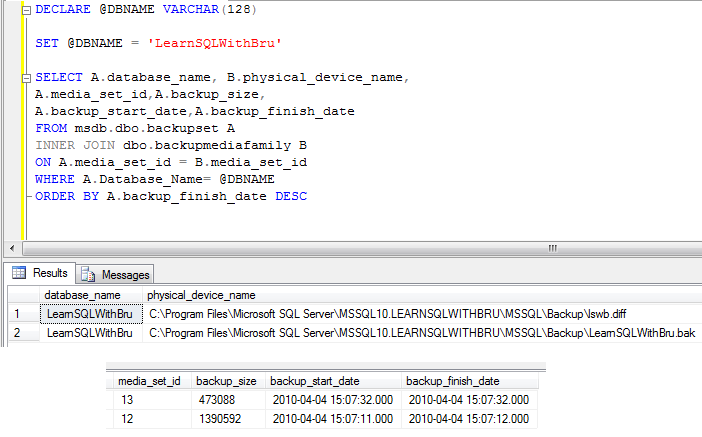
One of the answers is, for our convenience to remember what type of backup is stored with what type of extensions. Most of the time I had worked, seen or heard, it was a general industry wide accepted extension of .BAK for Full backups, .DIFF for Differential and .TRN for transactional (Upper case is not a must, only to highlight the file extension). Doing this way, it would be easier across your team (of 2 or 20) to recognize what is the backup type by looking at the file extension. 

SQL Server does not have problem with the file extension as long as the file is a valid file. You can name your backup as db_full.zip or . sql or any funny extension as you wish and write the backup information into that file. If the backup was completed successfully, you can use that file to restore without any issues..

Why should this be practiced?

Why it should be named using a certain extensions, the reasons are many. The first reason is to quicken you restores, yes the ultimate goal of a backup is to restore your data in case of a failure (user, hardware or a natural disaster). So when you are trying to restore you database from your backups, you would want to know what kind of backup is that backup file just by looking at the extension. As soon as you see that it is a .diff, you know, ok this is my differential backup file. You would not want to waste time by running a restore command against a backup file and then the see a message that this is not the kind of backup the SQL Server is waiting for..

To give you another reason, usually there are exceptions added in your server Anti Virus software so that as soon as it sees certain files with extensions, such as .bak or .diff or .trn, it would not run a virus check, in order to save the disk read / write overhead and the processor usage on the server.

Finally, what if a backup file saved with extension “.jkl” and due to an unrecognized extension the file was deleted by one of your team members. May be that might be the only backup copy and that was deleted…

Remember this.. Being a DBA is to plan for the most unexpected disaster to happen and still be able to get everything covered..

Do you like this site? Like our FB page @ Facebook.com\LearnSQLWithBru so that, you know when there is a new blog post.

–Bru Medishetty